- JavaScript 89.8%
- CSS 5.7%
- HTML 3.3%
- C++ 1.2%
| Filename | Latest commit message | Latest commit date |
|---|---|---|
|
|
||
| .forgejo/workflows | ||
| api | ||
| app | ||
| arduino | ||
| public | ||
| .gitignore | ||
| .npmrc | ||
| 7zas | ||
| build-package.json | ||
| index.mjs | ||
| LICENSE | ||
| package.json | ||
| README.md | ||

Church Streamer
A node application GUI management tool to run, monitor, and maintain running ffmpeg instances. With detection for errors and auto-restart in a pickle, it is supposed to be an easy tool to be able to make sure ffmpeg streaming or encoding is stable.
Also includes a simple HLS detection and pusher logic to push HLS segments to a streaming server due to how bad ffmpeg HTTP client is.
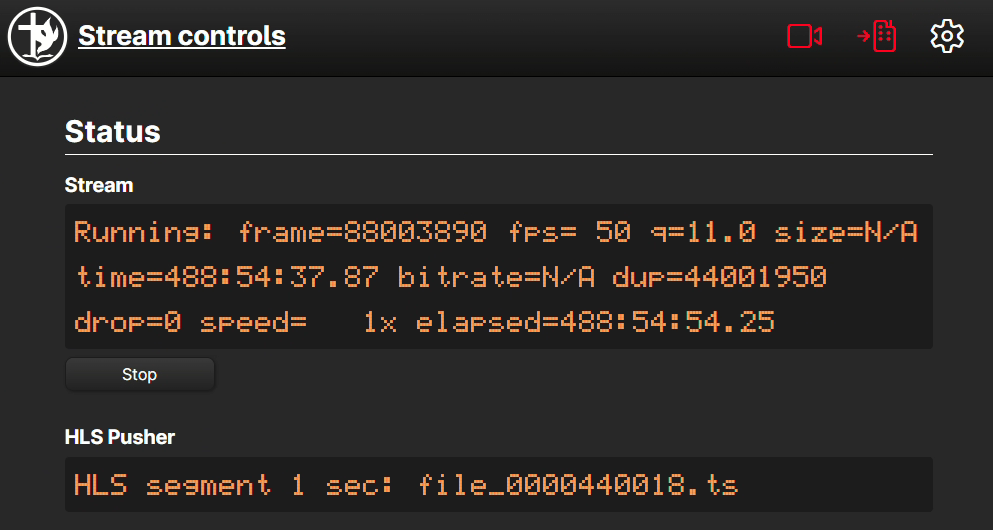
Quickrun
npm install
npm run build
npm run dev
Install as service
Church Streamer is designed to be run as a service, either windows service or linux service.
It uses service-core which is a library for self-managing, updating and clustering node applications.
This requires some minor setup.
Create the following config.json file
{
  "name": "streamer",
  "serviceName": "Filadelfia Streamer",
  "description": "Service to start or stop filadelfia stream",
  "church_streamer": {
    "provider": "git",
    "url": "https://git.nfp.is/api/v1/repos/thething/church_streamer/releases",
    "cluster": 1,
    "port": 5000,
    "scAllowStop": true,
    "heartbeatPath": "/api/health",
    "NODE_ENV": "production"
  },
  "manager": {
    "provider": "git",
    "url": "https://git.nfp.is/api/v1/repos/thething/sc-manager/releases",
    "port": 4880,
    "scAllowStop": false
  }
}
Create the runner.mjs file:
import { runner } from 'service-core'

runner(import.meta.url, 'config.json', 'db.json')
.then(
  function(core) { core.log.info('core is running')},
  function(err) { runner.log.error(err, 'Error starting runner'); process.exit(1) }
)
Windows service installation:
Create the following install.mjs file:
import path from 'path'
import { readFileSync } from 'fs'
import { fileURLToPath } from 'url'
import nodewindows from 'node-windows'

function getPathFromRoot(add) {
  const __dirname = path.dirname(fileURLToPath(import.meta.url));
  return path.join(__dirname,'./', add)
}

let config = JSON.parse(readFileSync(getPathFromRoot('./config.json')))

const Service = nodewindows.Service

let serviceConfig = {
  name: config.serviceName,
  description: config.description,
  script: getPathFromRoot('./runner.mjs'),
  env: {
    name: 'NODE_ENV',
    value: 'production',
  },
  wait: 0,
  grow: .5,
  maxRestarts: 10
}

console.log('Service', serviceConfig)

// Create a new service object
let svc = new Service(serviceConfig);

svc.on('install',function(){
  svc.start();
});

svc.on('alreadyinstalled',function(){
  svc.start();
});

svc.install();
Finally it's time to install things (the last step needs to be run as administrator).
npm install service-core
npm install node-windows
node install.mjs
That's it. It should automatically download the latest version off of this repo, self-update, self-restart and auto-start.
Linux service installation
Install service-core to the folder:
npm install service-core
Create the following systemctl service file /etc/systemd/system/myapp.service
[Unit]
Description=Service for My App
After=network.target
StartLimitIntervalSec=0

[Service]
Type=simple
Restart=always
RestartSec=1
User=myapp
ExecStart=node /home/myapp/runner.mjs
WorkingDirectory=/home/myapp
StandardOutput=append:/var/log/apps/myapp.stdout.log
StandardError=append:/var/log/apps/myapp.stderr.log

[Install]
WantedBy=multi-user.target
Then run it
systemctl daemon-reload
systemctl enable myapp
systemctl start myapp